Classification Module (tmg_gui)
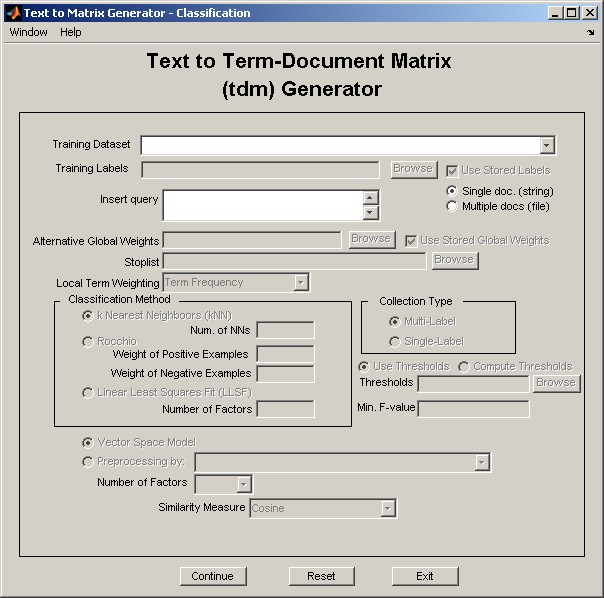
classification_gui is a graphical user interface for "Text to Matrix Generator" that can be used for applying a set of classification algorithms to term-document matrices (TDM's) constructed from tmg_gui.
See a demonstration of classification_gui.
For complete up-to-date documentation visit the TMG Wiki:
| Field Name | Default | Description |
| Training Dataset | - | The training dataset. |
| Training Labels | - | The labels of the training dataset. |
| Use Stored Labels | - | Check to use the stored vector of labels of training documents in the container folder. |
| Insert query | ● | The test document(s). |
| Single doc. (string) | ● | Check if a single test document is to be inserted. |
| Multiple docs (file) | - | Check if multiple test document are to be inserted. |
| Filename | - | In 'Multiple docs (file)' is checked, insert the filename containing the test documents. |
| Delimiter | - | In 'Multiple docs (file)' is checked, insert the delimiter o be used for the test documents. |
| Line Delimiter | ● | In 'Multiple docs (file)' is checked, check if delimiter of test documents' file takes a whole line of text. |
| Alternative Global Weights | - | Global weights vector used for the construction of the test documents' vectors. |
| Use Stored Global Weights | ● | Use the global weights vector found on the container directory of the training dataset. |
| Stoplist | - | Use a stoplist. |
| Local Term Weighting | Term Frequency | The local term weighting to be used. |
| k-Nearest Neighboors (kNN) | ● | Check if the kNN classifier is to be applied. |
| Num. of NNs | - | Number of Nearest Neighboors in kNN classifier. |
| Rocchio | - | Check if Rocchio classifier is to be applied. |
| Weight of Positive Examples | - | The weight of the positive examples in the formation of the centroids vectors in Rocchio. |
| Weight of Negative Examples | - | The weight of the negative examples in the formation of the centroids vectors in Rocchio. |
| Linear Least Squares Fit (LLSF) | - | Check if LLSF classifier is to be applied. |
| Number of Factors | - | Number of factors used in the course of LLSF. |
| Multi-Label | ● | Check if classifier is to be applied for a multi-label collection. |
| Single-Label | - | Check is classifier is to be applied for a single-label collection. |
| Use Thresholds | ● | If 'Multi-Label' radio button is checked, use a stored vector of thresholds. |
| Compute Thresholds | - | If 'Multi-Label' radio button is checked, compute thresholds. |
| Thresholds | - | If 'Multi-Label' and 'Use Thresholds' radio buttons are checked, supply a stored vector of thresholds. |
| Min. F-value | - | If 'Multi-Label' and 'Compute Thresholds' radio buttons are checked, supply minimum F1 value used in the thresholding algorithm. |
| Vector Space Model | ● | Use the basic Vector Space Model. |
| Preprocessing by | - | Use preprocessed training data with: 'Singular Value Decomposition', 'Principal Component Analysis', 'Clusteredd Latent Semantic Analysis', 'Centroid Mathod', 'Semidiscrete Decomposition', 'SPQR'. |
| Number of Factors | - | Number of factors for preprocessed training data. |
| Similarity Measure | Cosine | The similarity measure to be used. |
| Continue | - | Apply the selected operation. |
| Reset | - | Reset window to default values. |
| Exit | - | Exit window. |